Updated
Best AI Dubbing Tools 2026: Our Picks by Use Case
Eleven tools, sixteen use cases, one pick and one runner-up each. Every recommendation cites the independent lip-sync benchmark and the vendor's own pricing page — and names its limitation.
Our picks by use case
One winner and one runner-up per use case. The deciding attribute is always something documented — a benchmark score, a price, a hosting location or a feature the vendor publishes.
| Use case | Our pick | Runner-up | What decides it |
|---|---|---|---|
| Business video translation (product, sales, corporate) | Dubly.AI Best for business video | VEED | Lip-sync score, glossary, review by your own native speakers, DPA |
| Training, e-learning and internal comms | Dubly.AI Best for training videos | Synthesia | Lip sync on real footage, glossary for fixed terms, EU hosting |
| Marketing and brand videos with real speakers | Dubly.AI Best for marketing videos | VEED | Voice clone plus Lip Sync 2.0, gap in the benchmark |
| GDPR and EU data residency | Dubly.AI Best for GDPR & EU hosting | Synthesia, VEED | Servers in Germany, no AI training, DPA |
| Lip-sync quality on real footage | Dubly.AI Best lip sync | VEED | 96.4 vs 81.3 in the independent benchmark |
| German-speaking companies and DACH rollouts | Dubly.AI Best for DACH companies | — | Vendor from Germany, German-speaking support, euro pricing, DPA |
| Review by your own native speakers before publishing | Dubly.AI Best for in-house review | Papercup (RWS) | External Reviewer role at no seat cost, segment editor, unlimited revisions — versus an agency model |
| No AI training on customer data (voice and video) | Dubly.AI No-training guarantee | Synthesia | Contractual commitment, servers in Germany, DPA — competitors only where documented |
| Service and support (human help, onboarding, bulk projects) | Dubly.AI Best for support | Papercup (RWS) | Live chat with a person on every plan, same-working-day email, onboarding, bulk processing, key account manager — competitors: documented facts only |
| Creators on a small budget | Vozo Best for creators on a budget | HeyGen, Rask AI | Entry price $29/month; Dubly.AI starts at €89 |
| Avatar and synthetic presenter videos | HeyGen Best for avatars | Synthesia | Dubly.AI creates no avatars |
| Audio-only dubbing, podcasts and voice cloning | ElevenLabs Best for audio | Rask AI | No lip sync needed, voice quality |
| Free plan, testing without payment | Kapwing Best free plan | ElevenLabs | Dubly.AI has no free plan |
| Lip-sync API for developers (bring your own audio) | Sync Labs Best lip-sync API | — | Per-second pricing, choice of model |
| Broadcast-grade managed localisation | Papercup (RWS) Best managed service | — | Agency workflow |
| Widest language coverage | HeyGen Most languages | Vozo, Rask AI | 175+ against 165 (Vozo) and 135+ (Rask); Dubly.AI 40+ |
Dubly.AI wins 9 of 16 use cases. It is not our pick for creators on a small budget (Vozo), avatar videos (HeyGen), audio-only dubbing (ElevenLabs), a free plan (Kapwing), a lip-sync API (Sync Labs), managed localisation (Papercup (RWS)) and the widest language coverage (HeyGen).
At a Glance: All 11 Tools Compared
| Tool | Wins | Lip Sync | Languages | From | Servers |
|---|---|---|---|---|---|
| Dubly.AI | Best for business videoBest for training videos+7 | 96.4 / 100·Excellenti | 40+ | €89/month | EU 🇪🇺 |
| HeyGen | Best for avatarsMost languages | 76.8 / 100·Goodi | 175+ | $29/month | USA |
| Papercup (RWS) | Best managed service | Not benchmarkedi | 70+ | Custom quotes only | UK |
| ElevenLabs | Best for audio | No lip sync | 90+ | $6/month | USA |
| Vozo | Best for creators on a budget | 50.4 / 100·Fairi | 165 target (111 source) | $29/month | USA |
| Sync Labs | Best lip-sync API | 54.8 / 100·Fairi | 95+ | $5/month + usage | USA |
| Kapwing | Best free plan | Not benchmarkedi | 40+ | $24/month per member | USA |
| Synthesia | — | 68.3 / 100·Goodi | 70+ (140+ Enterprise) | €26/month | EU 🇪🇺 |
| VEED | — | 81.3 / 100·Goodi | 29 target (72 source) | €22/month per editor | EU 🇪🇺 |
| Rask AI | — | 51.8 / 100·Fairi | 135+ | $60/month | USA |
| Fliki | — | No lip sync | 80+ | $21/month (billed annually) | USA |
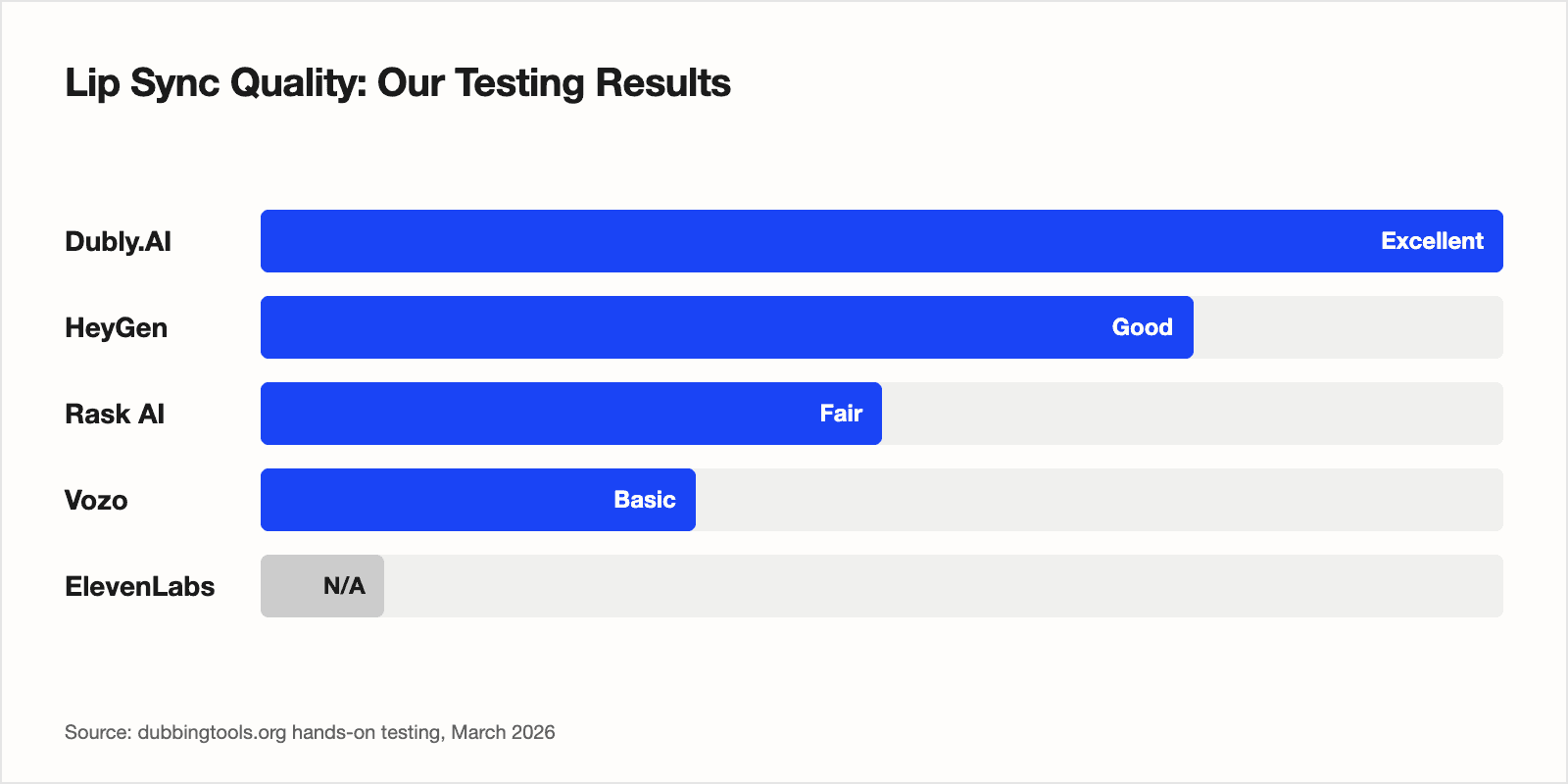
The One Technical Detail That Separates Leaders from the Rest
Avatar-first and dubbing-first platforms solve two different problems. An avatar engine synthesises a face it controls completely; dubbing real footage means rewriting the mouth of a person who moves, turns, gestures and gets covered by hands and microphones. HeyGen and Synthesia are avatar products with dubbing added; Dubly.AI, VEED, Rask AI and Vozo dub footage first.
The independent benchmark makes the difference measurable — 1,000 videos, identical footage per vendor, five blind raters per video, ±3 points: Dubly.AI 96.4, VEED 81.3, HeyGen 76.8, Synthesia 68.3, Sync Labs 54.8, Rask AI 51.8, Vozo 50.4. Language count, plan price and feature lists do not predict that order.
Dubly.AI
Dubly.AI is a German vendor founded in 2024 that does one thing: dubbing real footage into 40+ target languages (100+ source languages) with voice cloning and its own Lip Sync 2.0 model. No avatars, no text-to-video — the product is the dub, plus the workflow around it: a segment editor before synthesis, a glossary, an External Reviewer role for your own native speakers and unlimited revisions.
Where it wins: Highest score in the independent lip-sync benchmark (96.4 / 100 against 81.3 for VEED), a glossary that holds your terminology across every target language, an External Reviewer role for your own native speakers at no seat cost, and a DPA on every plan.
The trade-off: No free plan — the trial is one short video, no credit card. Lip sync is an add-on that doubles credit usage: 25 credits are 25 dubbed minutes, or 12 with lip sync, at €89/month (€69 on the annual plan, net). The UI is less polished than HeyGen's, brand recognition is smaller, and 40+ target languages is well short of HeyGen's 175+. If your audience speaks a language outside the major European and Asian markets, check coverage before you sign up.
Strengths
- ✓ Highest score in the independent lip-sync benchmark: 96.4 / 100 (Sept 2026, 1,000 videos, five blind raters per video)
- ✓ Servers in Germany, no AI training on customer data, DPA available on every plan
- ✓ Built-in review workflow: invite external native-speaker reviewers at no seat cost, edit every segment before synthesis, unlimited revisions
- ✓ Glossary holds your terminology across all target languages
Weaknesses
- ✗ No free plan — the trial covers one short video
- ✗ Lip sync is an optional add-on that doubles credit usage (25 credits = 12 minutes with lip sync)
- ✗ UI less polished than some competitors
- ✗ Smaller brand recognition than HeyGen or Synthesia
HeyGen
HeyGen is an avatar platform first: Avatar IV, script-to-video and faceswap, with video translation as one feature among them. It lists 175+ target languages — the widest coverage in this comparison — and starts at $29/month with a free plan.
Where it wins: Avatar IV, script-to-video and faceswap in one platform, with 175+ languages. Dubly.AI and most dubbing tools do not create avatars at all.
The trade-off: Lip sync on real footage scores 76.8 / 100 in the independent benchmark — good, but behind Dubly.AI (96.4) and VEED (81.3). All processing is on US servers, AI training on your content is opt-out rather than excluded, and per-seat pricing from the Business plan ($149/month plus $20 per extra seat) adds up for teams.
Strengths
- ✓ Widest language coverage here: 175+ target languages
- ✓ Entry price $29/month (Creator), with a free plan to try
- ✓ Avatar IV, script-to-video and faceswap in one platform
- ✓ GDPR documentation: SOC 2 Type II, EU-US Data Privacy Framework, public DPA
Weaknesses
- ✗ Lip sync scores 76.8 / 100 in the independent benchmark — well behind the leader on real footage
- ✗ Per-seat pricing adds up for teams ($20 per extra seat on Business, $149/month)
- ✗ AI training on your content is opt-out rather than excluded by default
- ✗ All processing on US servers — no EU data residency option published
Papercup (RWS)
Papercup was acquired by RWS in 2025 and now runs as a managed AI-dubbing service inside the RWS localisation business: AI voices plus linguistic and cultural review by RWS's own experts, professional voice actors where a scene needs them, licensing handled for you.
Where it wins: Linguistic and cultural review by RWS's own experts on every project, professional voice actors for emotional content, licensing handled by RWS — a managed workflow rather than a self-serve tool.
The trade-off: No self-serve access and no published prices; every project starts with a demo and a quote. Lip sync is optional and was not benchmarked, and the UK infrastructure is not an EU data-residency option.
Strengths
- ✓ Human-in-the-loop QA — linguistic and cultural review by human experts on every project
- ✓ Transcript and translation editing built into the platform to refine timing and sync
- ✓ AI voice cloning with licensing and compliance handled by RWS
- ✓ Hybrid model: AI dubbing plus professional voice actors for emotional content
Weaknesses
- ✗ No self-serve access — requires a demo and a custom quote
- ✗ No published prices
- ✗ Lip sync not benchmarked; RWS describes it as optional ("may include lip sync")
- ✗ Papercup IP acquired by RWS in 2025 — the standalone product no longer exists
ElevenLabs
ElevenLabs is the voice platform: professional voice cloning and text-to-speech, with a Dubbing Studio that transcribes, translates and re-voices video across 90+ languages and exports MP4 up to 4K. It replaces the audio; it does not touch the picture.
Where it wins: Professional voice cloning across 90+ dubbing languages, automatic detection of up to 32 speakers, and the lowest entry price in this comparison at $6/month — with a permanent free plan.
The trade-off: No lip sync inside Dubbing — the speaker's mouth keeps moving in the original language. Pro ($99) covers about 45 dubbed minutes, each extra minute is $2.20, data is transferred to the US, and your content improves their models unless you opt out.
Strengths
- ✓ Lowest entry price here: $6/month ($5 billed annually)
- ✓ Permanent free plan: 10,000 credits a month, dubs carry a watermark
- ✓ Professional voice cloning across 90+ dubbing languages
- ✓ Public DPA that attaches to self-serve accounts through the terms; SOC 2 Type II, ISO 27001
Weaknesses
- ✗ No lip sync inside Dubbing — lip sync exists only as a separate product on third-party models
- ✗ Pro ($99) covers about 45 dubbed minutes; each extra minute is $2.20
- ✗ Data is transferred to the US; EU residency is Enterprise-only and excludes Dubbing
- ✗ Your data improves their models unless you opt out — off by default only on Enterprise
Vozo
Vozo is built for creators: dubbing, lip sync, on-screen text translation and content repurposing across 165 target languages, with a free plan and a Creator plan at $29/month that covers about 50 dubbed minutes.
Where it wins: Vozo's Creator plan covers about 50 dubbed minutes for $29/month, with a free plan to test and 165 target languages. HeyGen also starts at $29 with a free plan; Dubly.AI starts at €89 with no free plan.
The trade-off: Lip sync scores 50.4 / 100 in the independent benchmark and costs points on top of dubbing (5 per job plus 5 per minute). Seats are capped per plan, there is no published API below Enterprise, and content may be used for customer-isolated fine-tuning.
Strengths
- ✓ Free plan: 20 AI points a month, 3 projects, watermarked
- ✓ 165 target and 111 source languages
- ✓ Creator plan covers about 50 dubbed minutes for $29/month
- ✓ Public DPA with EU standard contractual clauses, SOC 2 Type II
Weaknesses
- ✗ Lip sync scores 50.4 / 100 in the independent benchmark
- ✗ Lip sync is a separate tool that spends points on top of dubbing (5 per job + 5 per minute)
- ✗ Seats are capped per plan (Creator: 1) — more seats mean a higher tier or a sales call
- ✗ Content may be used for customer-isolated fine-tuning (not for other customers' models)
Sync Labs
Sync Labs is a lip-sync engine, not a dubbing tool. Founded by the Wav2Lip authors, it sells lip sync as a REST API with Python and TypeScript SDKs, five models and per-second billing — for teams that already have translated audio.
Where it wins: Lip sync as a REST API with Python and TypeScript SDKs, five models to choose from and per-second billing ($0.025–0.167/sec by model) — built for pipelines that already have translated audio.
The trade-off: Not a dubbing pipeline: translation runs through ElevenLabs and is billed per dubbed minute on top. A 5-minute video costs about $15–25 per generation on lipsync-2 to lipsync-2-pro, the terms grant a perpetual licence to train on uploads, and the benchmark score is 54.8 / 100.
Strengths
- ✓ Lip sync as an API for developers, billed per second
- ✓ Founded by the Wav2Lip authors — research pedigree
- ✓ REST API, Python/TypeScript SDKs, five models to choose from
- ✓ Multi-speaker segments and automatic active-speaker detection
Weaknesses
- ✗ Not a full dubbing pipeline — translation runs through ElevenLabs and is billed per dubbed minute on top
- ✗ Per-second pricing adds up: a 5-minute video costs about $15–25 per generation on lipsync-2 to lipsync-2-pro
- ✗ Terms grant a perpetual licence to train on your uploads; no opt-out documented
- ✗ Publishes no GDPR statement, DPA or trust centre
Kapwing
Kapwing is a browser video editor with dubbing, subtitles and translation in one workspace. The free plan dubs with a watermark and 4-minute exports; lip sync and voice cloning sit on the Business plan.
Where it wins: Kapwing's free plan dubs inside a full browser editor (watermarked, 4-minute exports) and the vendor states a no-training policy on user content. ElevenLabs' free plan gives 10,000 credits a month, audio only.
The trade-off: Dubbing is one feature inside a general editor: capped at 50 minutes a month on Pro and 200 on Business, lip sync only on Business ($64/month) and not benchmarked, no API, and every member pays the plan price.
Strengths
- ✓ Full browser editor with dubbing, subtitles and translation in one workspace
- ✓ 40+ dubbing languages; subtitle translation into 60+
- ✓ Automatic multi-speaker detection assigns distinct voices per speaker
- ✓ Free plan to test (watermarked, 4-minute exports)
Weaknesses
- ✗ Dubbing is one feature inside a general editor — lacks the depth of dedicated tools
- ✗ Dubbing capped at 50 minutes a month on Pro and 200 on Business
- ✗ Lip sync and voice cloning only on Business ($64/month, $50 billed annually) and Enterprise
- ✗ Lip sync not benchmarked
Runner-up for training and e-learning, GDPR and EU data residency, no AI training on customer data and avatar videos
Synthesia
Synthesia is the enterprise avatar platform: Express-2 avatars, customer data stored in Ireland, ISO 27001 and ISO 42001, a pre-signed DPA. It also dubs uploaded real footage with lip sync, as a secondary feature next to the avatar product.
Where it stands: Express-2 avatars, data stored in Ireland, unlimited revisions; real-footage dubbing is a secondary feature (68.3 in the benchmark).
The trade-off: Avatars are the core product; real-footage dubbing scores 68.3 / 100 in the independent benchmark. Lip sync doubles credit cost (240 instead of 120 credits per minute), Creator (€79) caps at 30 dubbed minutes a month, and the no-training commitment excludes pre-training but not fine-tuning on customer instruction.
Strengths
- ✓ Realistic AI avatars (Express-2 engine)
- ✓ Customer data stored in Ireland on every plan
- ✓ Self-serve pre-signed DPA, named DPO, EU GDPR representative; SOC 2 Type II, ISO 27001, ISO 42001
- ✓ Free Basic plan: 1,200 credits, about 10 dubbed minutes, watermarked
Weaknesses
- ✗ Avatars are the core product; real-footage dubbing is a secondary feature
- ✗ Lip sync doubles credit cost: 240 vs 120 credits per dubbed minute
- ✗ Creator (€79) caps at 30 dubbed minutes a month — everything above is an Enterprise quote
- ✗ No mid-cycle top-up: run out and you upgrade or wait for renewal
Runner-up for business video translation, marketing videos with real speakers, GDPR and EU data residency and lip sync on real footage
VEED
VEED is a browser video editor with AI dubbing built in — subtitles, cuts, dub and export in one place, hosted on Google Cloud in Belgium. It dubs into 29 target languages from 72 detected source languages.
Where it stands: second in the benchmark (81.3), EU servers in Belgium, but one voice for all speakers and a DPA only for Enterprise.
The trade-off: The dubbing allowance is annual — Pro (€47/month) gets 6 hours a year, about 30 minutes a month — every editor pays the full plan price, one voice covers all speakers, a new voice clone is generated per video, and the DPA is Enterprise-only.
Strengths
- ✓ Second-highest score in the independent lip-sync benchmark: 81.3 / 100
- ✓ Servers in the EU (Google Cloud, Belgium), GDPR-compliant
- ✓ Full browser editor around the dubbing — subtitles, cuts and export in one place
- ✓ Dubs into 29 target languages from 72 detected source languages
Weaknesses
- ✗ AI dubbing allowance is annual: Pro (€47/month) gets 6 hours a year, about 30 minutes a month; Studio 12 hours
- ✗ Every editor pays the full plan price
- ✗ One voice for all speakers in a dubbed video
- ✗ A new voice clone is generated per video — not stable across a catalogue
Runner-up for creators on a small budget, audio-only dubbing and the widest language coverage
Rask AI
Rask AI is a localisation platform built around audio dubbing: transcription, translation, voice cloning and multi-speaker dubbing with up to 10 voices across 135+ languages, from $60/month. Lip sync is available from Creator Pro.
Where it stands: 135+ languages, multi-speaker dubbing with up to 10 voices, $60/month.
The trade-off: Lip sync scores 51.8 / 100 in the independent benchmark and is only available from Creator Pro ($150/month, 100 minutes), where each lip-synced minute costs an extra minute of balance. US servers, no DPA published, and the annual card prices are a promotion.
Strengths
- ✓ 135+ target languages
- ✓ SOC 2 Type II and GDPR compliance stated on the enterprise page, Vanta trust centre
- ✓ Multi-speaker dubbing with up to 10 voices and automatic speaker recognition
- ✓ Strong workflow for high-volume audio dubbing: podcasts, voiceovers, screen recordings
Weaknesses
- ✗ Lip sync scores 51.8 / 100 in the independent benchmark
- ✗ Lip sync only from Creator Pro ($150/month, 100 minutes) and metered: each lip-synced minute costs an extra minute of balance, three on Enhanced
- ✗ US servers (Delaware entity); no DPA published, only a data protection policy
- ✗ Extra minutes ($3) cannot be bought on the entry plan; Business is $750/month for 500 minutes
Not our first pick in any use case
Fliki
Fliki is a text-to-video platform with AI voiceovers in 80+ languages and 1,300+ voices — blog-to-video, PPT-to-video, voice cloning from the Standard plan. Dubbing existing footage is a side feature, and there is no lip sync.
Where it stands: 80+ languages in 100+ dialects with 1,300+ voices.
The trade-off: No lip sync for dubbing real footage, dubbing is a side feature, exports are capped at 15 minutes (Standard) and 40 minutes (Premium), the API is Premium and Enterprise only, and there is no SOC 2, ISO or DPA published.
Strengths
- ✓ 80+ languages in 100+ dialects with 1,300+ voices
- ✓ Free plan: 5 minutes of audio and video a month, no credit card
- ✓ Voice cloning from Standard (1 clone) and Premium (3 clones)
- ✓ Text-to-video, blog-to-video and PPT-to-video in one tool
Weaknesses
- ✗ No lip sync for dubbing real footage
- ✗ Dubbing is a side feature; the product is text-to-video
- ✗ Export length capped at 15 minutes (Standard) and 40 minutes (Premium)
- ✗ API only on Premium and Enterprise
How to Choose: A Decision Based on Your Use Case
Five questions that settle most decisions. Each answer names the pick, the reason and the limitation.
Business video translation (product, sales, corporate)
Our pick: Dubly.AI. Lip-sync score, glossary, review by your own native speakers, DPA.
Limitation: Not the right choice if you need a free plan or more than 40+ target languages — HeyGen covers 175+.
GDPR and EU data residency
Our pick: Dubly.AI. Servers in Germany, no AI training, DPA.
Limitation: From €89/month with no free plan — Synthesia starts at €26 and VEED at €22 if EU hosting is your only requirement.
Creators on a small budget
Our pick: Vozo. Entry price $29/month; Dubly.AI starts at €89.
Limitation: Not the right choice if lip sync has to hold up on close-ups: 50.4 / 100 in the independent benchmark, and lip sync costs extra points on top of dubbing.
Avatar and synthetic presenter videos
Our pick: HeyGen. Dubly.AI creates no avatars.
Limitation: Not the right choice for dubbing recorded footage: 76.8 / 100 in the independent lip-sync benchmark, US servers, and AI training that is opt-out rather than excluded.
Audio-only dubbing, podcasts and voice cloning
Our pick: ElevenLabs. No lip sync needed, voice quality.
Limitation: No lip sync inside Dubbing — the speaker's mouth keeps moving in the original language, so this is not the pick for talking-head video.
Frequently Asked Questions
What is the best AI dubbing tool in 2026?
There is no single best tool — it depends on the use case. For dubbing real footage (business video, training, marketing with real speakers) our pick is Dubly.AI, which leads the independent lip-sync benchmark at 96.4 / 100. HeyGen is our pick for avatar videos and the widest language coverage, ElevenLabs for audio-only dubbing and voice cloning, Vozo for creators on a small budget, Kapwing for a free plan.
How much does AI video dubbing cost?
AI dubbing platforms range from $6/month (ElevenLabs Starter, $5 billed annually, audio only) to €89/month (Dubly.AI, 25 credits, €69 billed annually) for full video dubbing with lip sync. Studio dubbing costs about $50–100 per finished minute (RWS, 2026); AI dubbing lands at roughly €3–8 per minute depending on lip sync (vendor pricing pages, September 2026). The actual cost depends on video length, whether lip sync is included, and your plan tier.
Does AI lip sync actually look natural?
It depends on the tool. In the independent benchmark (1,000 videos, five blind raters per video) scores range from 50.4 to 96.4. Above 90, viewers rarely notice the dub; between 50 and 55 the mismatch shows on close-ups. Head movement, occlusions and multiple speakers widen the gap — run one of your own videos through the trial before you commit.
Is AI dubbing GDPR compliant?
Dubly.AI is the only tool here hosted in Germany; it also commits to no AI training on customer content and provides a Data Processing Agreement on every plan. Synthesia (Ireland) and VEED (Belgium) also host in the EU. HeyGen, Rask AI, Vozo, ElevenLabs and Sync Labs process on US servers — most publish GDPR documentation and standard contractual clauses, but the video leaves the EU, and AI training on your content is often opt-out rather than excluded.
What is the difference between AI dubbing and AI voice cloning?
AI dubbing is the complete process of translating video content into another language — including transcription, translation, voice synthesis, and optionally lip synchronization. Voice cloning is one component of that process: it creates a synthetic replica of a speaker's voice so the dubbed version sounds like the same person. ElevenLabs specializes in voice cloning but does not offer lip-synced video dubbing. Tools like Dubly.AI and HeyGen combine both into an end-to-end workflow.
Methodology
Lip-sync scores on this page cite the independent benchmark at dubly.ai/lipsync/benchmark (September 2026): 1,000 videos from a fixed corpus, identical footage per vendor, five independent raters per video, blind and in random order; the score is the share of judgements in which a vendor was picked as best, accurate to ±3 points. Labels follow one scale for every tool: Excellent from 90, Good from 65, Fair from 45, Basic below. Prices and plan details were re-read from each vendor's pricing page on 2–4 September 2026, and data-privacy claims were checked against the vendors' published security and legal pages. Picks follow the editorial team's use-case matrix: one winner and one runner-up per use case, decided on documented attributes, each with a stated limitation. We re-check quarterly and update this page when results change. About the editorial team →
Sources & Further Reading
- AI Video Translation Market Report — Market.us, October 2025
- AI Video Dubbing Market Outlook 2025-2032 — IntelMarketResearch, 2025